Part of the problem with developing Java is the plethora of IDEs out there, and the lack of standardisation. It’s not really a problem with IDEs as much as with Java server platforms, as IDEs are largely the same; server platforms are rarely the same.
With Perl, the lack of standardisation in IDEs is not considered as much a problem, for the simple reason that many Perl programmers are really old-school, and tend to prefer simple text editors. Most of my recent Perl work has been done through Vim.
However, after teaching a Java course recently through a combination of Eclipse and ConTEXT, I had a look at Eclipse’s support for Perl, particularly with a view to debugging support; Vim doesn’t have native step-through debugging, and Eclipse seems already suited to things like that.
If you’re already familiar with debugging in Eclipse, then the EPIC plugin is well worth looking at for its Perl support.
It’s got stepped debugging within the Debug perspective, just like Eclipse has with other languages. Its Perl support is not as strong as the Java support — the Watch features and relatively simple editor features like refactoring support leave a lot to be desired — but it’s got an easier learning curve than e.g. “perl -d” (the ‘standard’ way to debug perl), or even learning a new editor like Emacs, with its Perl debugging integration. Of course, as a Vim user I haven’t even learned to hack Perl in Emacs…
Although Perl doesn’t really do the whole OO concept of private/public access modifiers, it’s somewhat possible to approximate them using subroutine references.
my $print_rev = sub { print scalar reverse $_[0]; };
Now we have a lexically scoped variable, visible only within its package, containing a reference to an anonymous sub.
Within our class/package, we call it by doing something like:
&$print_rev("Reversed!");
Voila! Instant private method!
note: this is partway to creating closures, which are functions declared at runtime with, with variables passed as parameter. I might mention them some other time.
I was working on an open-source Perl application recently, paying particular attention to one of the modules within. Unfortunately, the formatting left a little to be desired, with a highly idiosyncratic and inconsistent level of indentation and use of bracketing.
Not one to be put off by this, I quickly installed perltidy, and ran it against the file.
perltidy Package.pm
After a few seconds, this created a file in the same directory called Perltidy.pm.tdy, with various changes made to the formatting.
The manpage showed it had a huge number of options, allowing one to choose from various different styles. For the most part, I was happy with the defaults. Although when coding C or LPC I prefer 3-space indents rather than two, Perl’s frequent use of block early-returns and flow modifiers like last and next means it makes sense to outdent them slightly. It’s easier to read such outdents when using 4-space indents.
My chosen options, in the end, looked like this:
-b – inplace tidying, saves the original file to .bak, rather than creating a newly-styled file with .tdy extension.
-ce – cuddle elses – the default places else on a new line after the previous closing brace, which allows closing-side comments, but disrupts the flow of the if statement.
-syn – do a syntax check with Perl while tidying
-okw – outdent keywords like next and last
-csc – enable closing-side comments – comments after the closing brace of a long sub or conditional statement.
-csci=12 – minimum number of lines in a block to add closing-side comment – the default is 6.
The problem now is how to check my changes back in without seriously upsetting the package maintainer; almost every line in the package has been changed, so the patch will be practically impossible for him to verify. Oh, well.
I’m quite a fan of both Java and Perl, for quite opposite reasons; Java is very strict, syntactically, and is rather good in collaborative environments as a result, where Perl is entirely the opposite of strict (even with use strict; in operation), and is therefore a delight to program in.
One thing they share is the ability to work with objects. However, this gives rise to an interesting difference: Java is object-oriented, where Perl is not.
In Java, you call a “function” by using its name, just like in any other language.
// declare the function
double square(int x){
   return x * x;
}


//somewhere else, we call it
double y = square(x);

Ditto, Perl:

# declare the sub
sub square(){
   my $x = shift;
   return $x * $x;
}

# somewhere else, we call it
my $y = square($x);

All very well, until we get into inheritance.


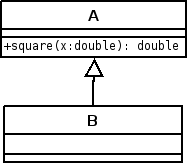
In Java, if the function “square” is declared in a superclass of the calling code, the above snippet will still work perfectly well; if we run double y = square(x); in code in class Banana, it will happily execute square() as if it were a local function.
Perl, on the other hand, is fundamentally a procedural language, so it assumes that function calls as shown above are internal to the current package. This means that if the sub “square” as shown above is in a superclass of the calling code, it won’t work.
This is where we have to _tell_ Perl that it’s using objects.
Firstly, some background. Inheritance in Perl is pretty easy: you create the inheriting package in the usual way, and you populate the @ISA array (pronounced “is-a”) with a list of packages to inherit, with the highest priority/affinity first. Yes, Perl supports multiple inheritance, which Java does not. As an example:

package 'Banana';
@ISA = ('Aardvark');

If package Banana contains the line of code my $y = square($x);, it will cause an error on execution, because Perl doesn’t know that square should be treated as an OO function, but rather it looks in the current scope for that function.
Now, if the calling code above is in a _different_ package, and contained an object reference to our package Banana in a variable $b, then we could get it to work by doing this:

$my $y = $b->square($x);
Interestingly, this will work whether square() is implemented in A or B. Go figure.
So, to get over this, we call the function via an object reference. In Perl, when an instance method is called (e.g. $b->square($x);), the first parameter to the function is the object reference. Conventionally, this is often written into a variable called $self.
If we need to call another function from that one, while retaining OO techniques, we use $self->otherfunction(). This solves our problem with inheritance, and is not a million miles removed from Java’s this keyword, although is far from implicit; remember, Java is fundamentally object-oriented, where Perl needs to be reminded.
Code samples:

package Aardvark;

sub square(){
    my($self, $x) = @_;
    return $x * $x;
}

package Banana;

use Aardvark;
our @ISA = ('Aardvark');


sub new {
    my $type=shift;
    return bless {}, $type;
}

# test calling an inherited instance method
sub printstuff {
    my $self=shift;
    print $self->square(5.2) . "n";
}


package main;

use Banana;
my $b = Banana->new();

# see if square works when called from Banana
$b->printstuff();

# see if square works when called from here, via Banana
print $b->square(1.5) . "n";
I’m quite a fan of the Memoir class, having used it a bit for reports and manuals here and there. I’ve used Beamer for a few presentations too, and thought to merge them recently for a course I’m writing.
However, I’ve been experiencing a hang during pdflatex execution when using the “itemize” environment.
It works fine with enumerate and description environments, and when I
use the book or article documentclasses. But because I like Memoir, I want to fix it.
So I did what every self-respecting techie would do, and posted to Usenet. We’ll see how this turns out.
Ever wanted to make a read-only point-in-time copy of a database, and wondered which technique to use? Microsoft SQL Server 2005 provides a plethora of ways to do this, including database backup/restore, database detach/re-attach, log-shipping, replication, mirroring, and so forth. However, one method available in the Enterprise edition, the Database Snapshot, is new to SQL Server 2005, and is worth taking a closer look.
Why are Database Snapshots Useful?
There are many applications where a point-in-time snapshot is useful. Microsoft suggest the following use cases:
Reporting up to a specific time period, ignoring later data
Reporting against mirror or standby databases that are otherwise unavailable
Insuring against user or administrator error, providing a quick way to revert to an older version of the database
Managing test databases, particularly during rapid feature and schema development
Of course, these needs could be served by a database backup or attached copy of a database, but the key benefit of choosing a snapshot over one of the other methods is simple: creating a database snapshot is fast.
Creating and Using Database Snapshots
Creating database snapshots is easy – it’s a CREATE DATABASE statement, specifying only the logical and physical filenames. Remember it’s a read-only snapshot, so we don’t need to add autogrowth or transaction log settings. Here’s the code:
SQL Statement to create a Database Snapshot
Snapshot creation is not supported by the Object Explorer interface in Management Studio; you must use a CREATE DATABASE statement as above, with the AS SNAPSHOT OF clause indicating the source database. Also, note that only the Enterprise edition of SQL Server 2005 supports database snapshots.
The snapshot contains a version of the data as it existed at its creation, having rolled back uncommitted transactions. This means that otherwise unavailable databases, such as mirrors and standby servers, can be used to create snapshots.
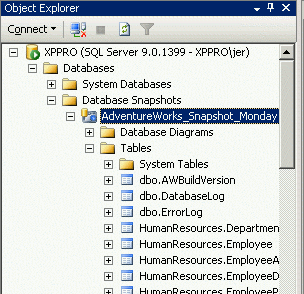
Having created a snapshot, you can now use it as you would any other read-only database; all objects are exposed in exactly the same way, via Object Explorer, scripts, or reporting tools.
Object Explorer showing the Database Snapshot
Reverting a database to the version stored in the snapshot is similarly easy:
<!–
   RESTORE DATABASE AdventureWorks FROM
   DATABASE_SNAPSHOT='AdventureWorks_Snapshot_Monday'
–>
SQL Script to restore from snapshot
This returns the database to the state it was in when the snapshot was created, minus any uncommitted transactions – remember that a snapshot is transactionally consistent at its creation. Note that restoring from a snapshot renders all other snapshots unusable – they should be deleted and re-created if required.
How do Database Snapshots work?
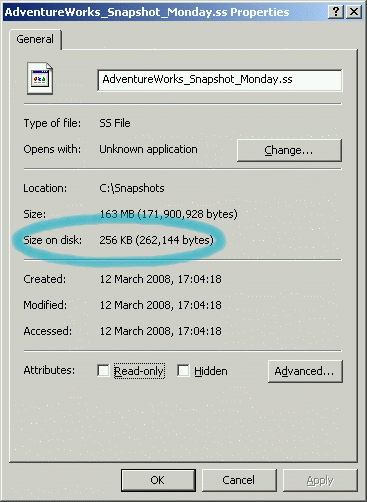
A Database Snapshot looks like an ordinary read-only database, from the user’s point of view; it can be accessed with a USE statement, and can be browsed from within Management Studio. However, it initially occupies almost no disk space, and so can be created almost instantly. This magic is achieved via an NTFS feature, sparse files. A sparse file is a file that may appear to be large, but in fact only occupies a portion of the physical space allocated to it.
Sparse file properties
Now, because a database snapshot presents a read-only view of your source database, it need not store a copy of every page. Instead, SQL Server performs a copy-on-write operation; in the source database, the first time a data page changes after the creation of a snapshot, a copy of the original page is placed in the sparse file. The snapshot serves data from the snapshot copies where source data has changed, and the original source pages when they are unchanged.
Best Practices
Sometimes you will choose a copy of a backup over a snapshot, sometimes it’ll be a detached copy of the data file. However, for many situations your best bet is a database snapshot, so it’s worth keeping some points in mind. In particular:
The file size will look considerably larger than the space it consumes on disk, and should be clearly marked as a snapshot for this reason. Use explicit naming conventions to make it clear to administrators.
Snapshots are at their best when young and fresh, and don’t take up too much space. If you need to keep a snapshot for any length of time, consider using another method to create your read-only copies.
As snapshots persist until deleted, you will need to explicitly rotate snapshots, either manually or with a script.
Performing index operations such as defragmentation or index rebuilding will modify so many pages that the snapshot will likely contain a complete copy of the source data for that index. The more snapshots there are, the more copies will exist.
If the disk containing a snapshot fills up, and a page write fails, the snapshot will become useless, as it will not contain all necessary pages. Make sure the disk can’t fill up!
Database snapshots are a worthwhile addition to the arsenal of any SQL Server DBA, and fit well with other techniques, particularly when you may need to quickly revert a database, or if you need to maintain rolling snapshots. Remember the key advantages: high speed and low physical size. But also remember that these advantages diminish as the snapshot ages and grows, and if the number of snapshots increases.
Above all, database snapshots are fast and easy to use; it won’t cost you anything to try them out, and you will probably find them very useful indeed. If all you need to do with a point-in-time copy is select from it, or possibly revert to it, then a database snapshot is likely the best choice available



 Jeremy Smyth's blog